
Server locations
VPN servers in 65+ countries
Choose from 6,000+ servers in 80+ locations. Pick a country or city in the app, and switch whenever you like. Every location is included in every plan.
- 30-day money-back guarantee on your first purchase (14 days on monthly plans)
- Up to 5 devices at once
- Windows, macOS, iOS, Android and Fire TV
What websites can see right now
- IP address
- Approximate location
- Internet provider
Connect to DarkMatter and websites see the VPN server’s IP address and location instead.
See everything websites can seeThe network
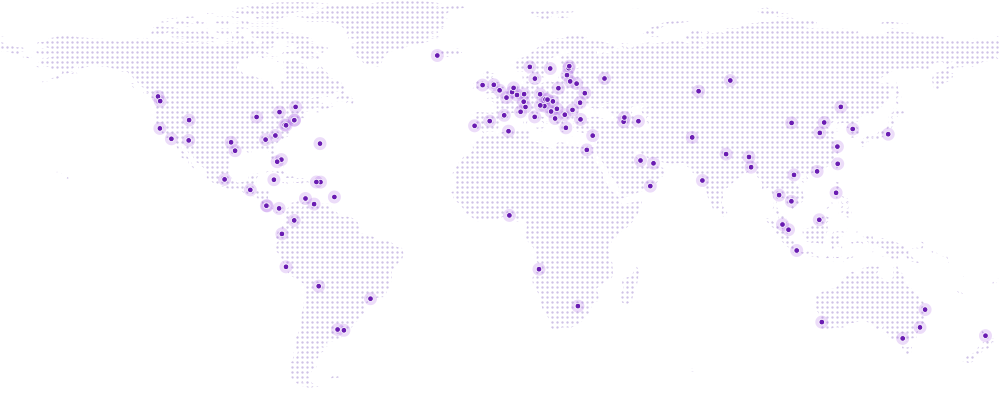
Servers around the world
Every city you can connect to in the DarkMatter app.
- Servers
- 6,000+
- Countries
- 65+
- Locations
- 80+
- Per server
- 20 Gbps
Figures for the network DarkMatter runs on, which our network partner operates.
Locations
Every location in the app
Search by country or city, or pick a region. Every location is included in every plan.
Europe

Albania
Tirana

Andorra
Andorra la Vella

Armenia
Yerevan

Austria
Vienna

Azerbaijan
Baku

Belarus
Minsk

Belgium
Brussels

Bosnia and Herzegovina
Sarajevo

Bulgaria
Sofia

Croatia
Zagreb

Cyprus
Nicosia

Czech Republic
Prague

Denmark
Copenhagen

Estonia
Tallinn

Finland
Helsinki

France
Paris

Georgia
Tbilisi

Germany
Frankfurt

Greece
Athens

Hungary
Budapest

Iceland
Keflavík

Ireland
Dublin

Italy
Milan, Rome

Latvia
Riga

Lithuania
Vilnius

Luxembourg
Luxembourg City

Moldova
Chisinau

Monaco

Netherlands
Amsterdam

Norway
Oslo

Poland
Warsaw

Portugal
Lisbon

Romania
Bucharest

Russia
Moscow, Novosibirsk

Serbia
Belgrade

Slovakia
Bratislava

Slovenia
Ljubljana

Spain
Madrid

Sweden
Stockholm

Switzerland
Zurich

Turkey
Istanbul

Ukraine
Kyiv

United Kingdom
London, Manchester
Americas

Argentina
Buenos Aires

Aruba
Oranjestad

Bahamas
Freeport

Barbados
Bridgetown

Bermuda
Hamilton

Bolivia
Sucre

Brazil
São Paulo

British Virgin Islands
Road Town

Canada
Montreal, Toronto, Vancouver

Cayman Islands
George Town

Chile
Santiago

Colombia
Bogotá

Costa Rica
San Jose

Ecuador
Quito

Guatemala
Guatemala City

Mexico
Mexico City

Panama
Panama City

Peru
Lima

Puerto Rico
San Juan

United States
19 cities
Ashburn, Atlanta, Charlotte, Chicago, Dallas, Denver, Houston, Las Vegas, Los Angeles, Miami, New York, Newark, Orlando, Phoenix, Portland, Salt Lake City, San Francisco, Seattle, Washington, DC

Uruguay
Montevideo

Venezuela
Caracas
Asia Pacific

Afghanistan
Kabul

Australia
Brisbane, Melbourne, Perth, Sydney

Bangladesh
Dhaka

Bhutan
Thimphu

Brunei
Bandar Seri Begawan

Cambodia
Phnom Penh

China
Beijing, Shanghai

Hong Kong

India
Mumbai

Indonesia
Jakarta

Japan
Tokyo

Kazakhstan
Astana

Malaysia
Kuala Lumpur

New Zealand
Auckland

Philippines
Manila

Singapore

South Korea
Seoul

Taiwan
Taipei

Thailand
Bangkok

Vietnam
Hanoi
Middle East and Africa

Algeria
Algiers

Angola
Benguela

Bahrain
Manama

Egypt
Cairo

Nigeria
Lagos

Oman
Salalah

South Africa
Johannesburg

United Arab Emirates
Dubai
The locations in the DarkMatter app on 28 July 2026. The network adds and retires locations from time to time; the app always shows the current list.
Whichever location you pick
What you get on every server
Modern protocols
WireGuard, OpenVPN, IKEv2 and IPSec run across the network. The app picks one for you, and you can switch if a network blocks it.
20 Gbps per server
Each server has a 20 Gbps connection. Your own speed still depends on your internet connection and how far away the server is.
An encrypted connection
Your traffic is encrypted between your device and the server. Your internet provider and the Wi-Fi you’re on can see you’re connected to a VPN, but not which sites you visit.
Every location on every plan
No premium locations and no extra charges: every plan includes the whole network, on up to 5 devices at once.
See every feature, including leak protection and split tunnelling
How to choose a server
A server location changes the IP address websites see. Here’s how to pick one.
Start with a server near you
For everyday browsing, a nearby server keeps the extra distance your traffic travels short. It’s a sensible default, and you can change it at any time.Pick a country when location matters
A server in another country gives you an IP address in that country; what a website shows you is up to that website.Can’t connect? Try another location or protocol
Try a different location first, then a different protocol; some networks block VPNs and we can’t promise it will connect.Check what websites see
Once you’re connected, our IP checker shows the address and approximate location websites see.
The honest bit
A server location changes your IP address, not who you are. Websites you sign in to still know it’s you, and streaming services decide for themselves whether to allow VPN connections.
Server location questions
What is a VPN server?
A VPN server is the computer your device connects to through an encrypted tunnel when you switch DarkMatter on. Your traffic travels to the server first, then on to the websites and apps you use, so they see the server’s IP address instead of yours. How a VPN works
How many servers and locations are there?
The network DarkMatter runs on has 6,000+ servers in 80+ locations across 65+ countries, and each server has a 20 Gbps connection. These are network-wide figures; the network is operated by our network partner.
Are all the servers in the countries they’re listed under?
Most are. Some locations are virtual: you get an IP address in the country you choose, from a server hosted in another country, usually a nearby one. The network uses them where it isn’t practical to run servers in the country itself. Websites see an address in the country you picked; the extra distance can make the connection a little slower. If it matters to you where a location’s servers are, ask us and we’ll tell you.
Can I choose a city, not just a country?
Some countries have servers in more than one city, such as London and Manchester in the United Kingdom, or Brisbane, Melbourne, Perth and Sydney in Australia. Where the app lists the cities, you can pick one.
Which server should I choose?
For everyday use, start with a server near you: the shorter the distance, the less your connection slows down. Pick a country when you need an IP address there. If a server won’t connect, try another one, then a different protocol. The help centre has more troubleshooting steps.
How do I change server?
Open the DarkMatter app, go to the list of locations, and choose a country (or a city). The app disconnects from the server you’re on and connects to the new one. You can switch as often as you like.
How can I check which server I’m connected to?
The app shows the location you’re connected to. To see what websites see, open our IP checker while you’re connected: it shows the IP address websites see and where that address appears to be.
What if I can’t connect to a server?
Try another location first, then a different protocol in the app’s settings. Some networks, such as hotel, school or office Wi-Fi, block VPN connections, so we can’t promise it will connect everywhere. If nothing works, contact us and we’ll help.
Is it legal to use a VPN?
Using a VPN is legal in the UK and in most countries. A few countries restrict or ban VPNs, so check the local rules before you travel. Whatever the country, a VPN doesn’t make anything illegal legal. Using a VPN when you travel
Is every location included in my plan?
Yes. Every plan includes every location and every feature, on up to 5 devices at the same time. Compare plans.
Will a server in another country let me use that country’s streaming services?
We can’t promise that. Streaming services decide for themselves whether to allow VPN connections, and what they show depends on their licensing. VPNs and streaming explains more.
Do the locations change?
Sometimes. The network adds and retires locations from time to time. The list on this page is from 28 July 2026; the app always shows the current one. If you need a particular country, ask us before you buy.
Pick a location and connect
Every plan includes every location, apps for Windows, macOS, iOS, Android and Fire TV and up to 5 devices at once.
- 30-day money-back guarantee on your first purchase (14 days on monthly plans)
- Up to 5 devices at once
- Windows, macOS, iOS, Android and Fire TV